
Using JavaScript for Email Validation Regex: A Practical Guide
Learn how to implement robust email validation in JavaScript using regex patterns. Discover best practices, code examples, and implementation strategies for effective email validation.

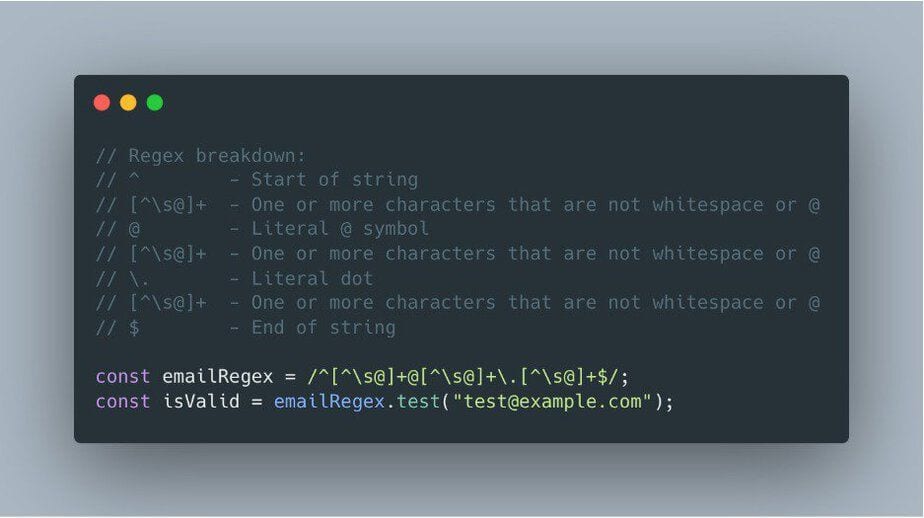
Is regex enough for email verification?
Regex is useful for catching obvious email formatting mistakes, but it is not enough for full email verification. A regular expression cannot reliably tell whether a mailbox is reachable, whether a domain accepts mail, or whether an address is disposable, risky, or likely to bounce.
JavaScript email validation doesn’t have to be complex. Master the regex pattern that catches invalid emails before they become a problem.
Here’s the quickest way to validate email addresses in JavaScript:
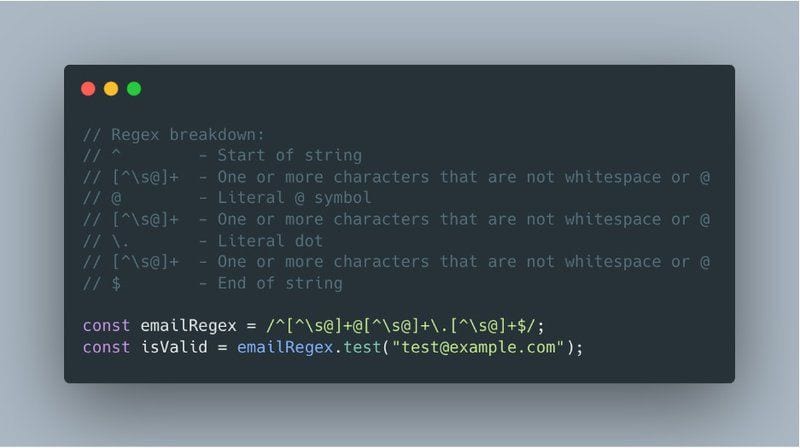
```javascript const emailRegex = /^[^s@]+@[^s@]+.[^s@]+$/; const isValid = emailRegex.test("[email protected]"); ```
- Understanding Email Validation Basics
- The Essential Email Validation Regex Pattern
- Creating a Robust Email Validation Function
- Advanced Email Validation Patterns
- Implementation Best Practices
- Testing and Troubleshooting
Email validation is crucial for maintaining clean contact lists and ensuring reliable communication with your users. While there are many approaches to validating email addresses, using regular expressions (regex) in JavaScript provides an efficient, client-side solution that can catch obvious formatting errors before they reach your server.
In this comprehensive guide, you’ll learn how to implement bulletproof email validation using JavaScript regex patterns. We’ll cover everything from basic implementation to advanced techniques, ensuring you can handle any email validation challenge that comes your way.
Quick Tip: While regex validation is excellent for catching basic formatting errors, combining it with a proper email verification service ensures the highest level of accuracy in your email validation process.
Whether you’re building a contact form, registration system, or email marketing platform, proper email validation is essential for maintaining proper email format and ensuring high deliverability rates. Let’s dive into the practical implementation that will help you achieve this.
Understanding Email Validation Basics
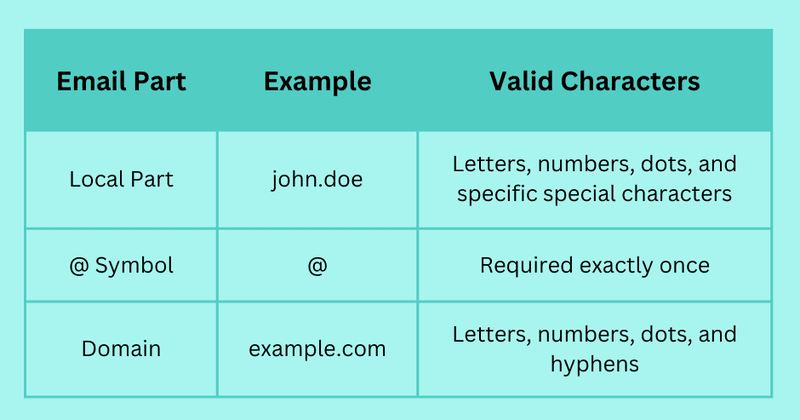
Before diving into regex patterns, it’s crucial to understand what makes an email address valid. An email address consists of three main parts: the local part (before the @), the @ symbol, and the domain (including the top-level domain).
Why Regular Expressions for Email Validation?
Regular expressions provide a powerful way to validate email addresses because they can:
- Check for proper email structure in real-time
- Prevent common formatting errors
- Provide immediate feedback to users
- Run efficiently on the client side
Client-Side Validation: This method provides immediate feedback to users in web applications, helping ensure that user inputs are correctly formatted before submission — a benefit Mailtrap also highlights for real-time client-side checks.
Common Email Validation Challenges
When implementing email validation, you’ll encounter several common challenges:
⚠️ Key Validation Challenges:
- Balancing strict validation with user convenience
- Handling international email formats
- Managing special characters in local parts
- Dealing with new top-level domains
While regex validation is an excellent first line of defense, it’s important to note that it should be part of a comprehensive validation strategy. As explained in our guide on how email verification works, combining client-side validation with server-side verification ensures the highest level of accuracy.
Understanding these basics is crucial for maintaining good email deliverability rates and preventing invalid emails from entering your system. With this foundation, let’s move on to implementing the essential regex pattern for email validation.
The Essential Email Validation Regex Pattern
Let’s break down the most reliable and efficient regex pattern for validating email addresses in JavaScript. This pattern strikes the perfect balance between accuracy and simplicity:
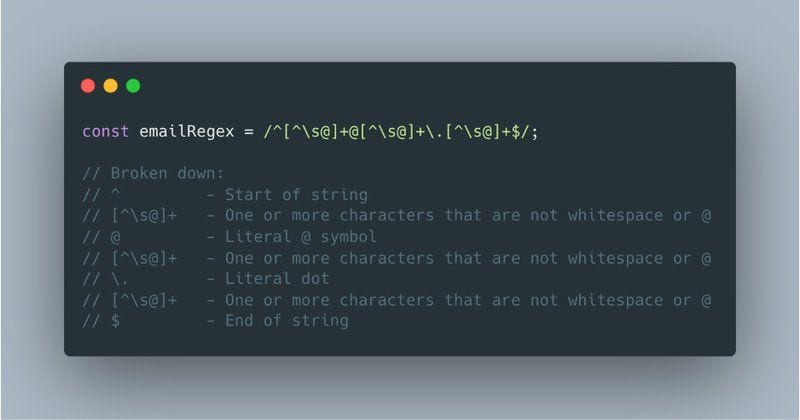
```javascript const emailRegex = /^[^s@]+@[^s@]+.[^s@]+$/; ```
Pattern Breakdown
Understanding each component of the regex pattern helps you implement it more effectively:
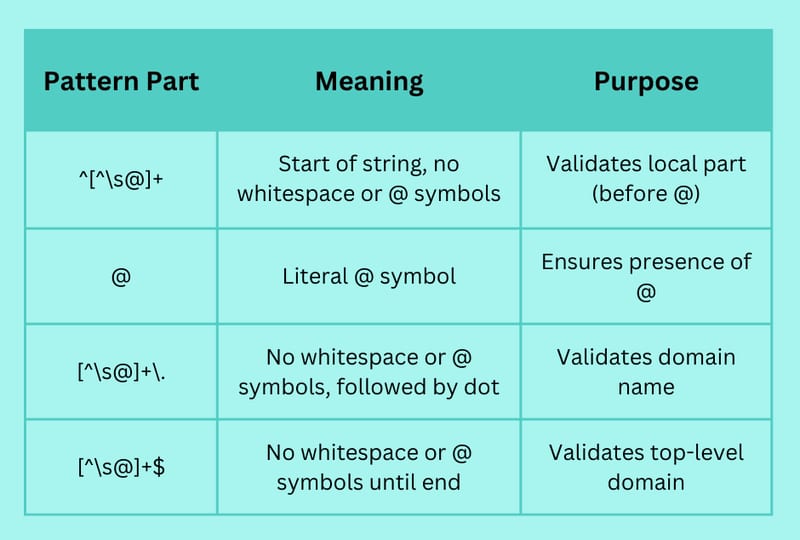
Implementation Example
Here’s a practical implementation of the email validation function:
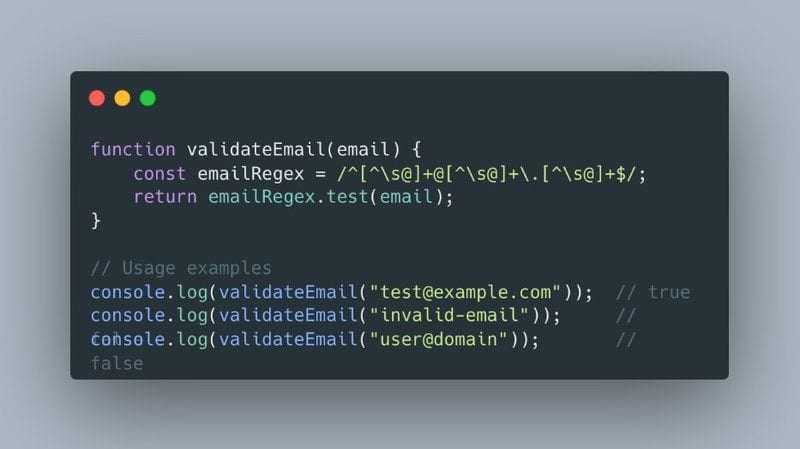
```javascript function validateEmail(email) { const emailRegex = /^[^s@]+@[^s@]+.[^s@]+$/; return emailRegex.test(email); } // Usage examples console.log(validateEmail("[email protected]")); // true console.log(validateEmail("invalid-email")); // false console.log(validateEmail("user@domain")); // false ```
⚠️ Important Note:
While this pattern catches most invalid email formats, it’s recommended to combine it with proper email verification for production environments. Check out our email validation best practices for more insights.
Test Cases and Results
Here’s how the pattern performs with various email formats:
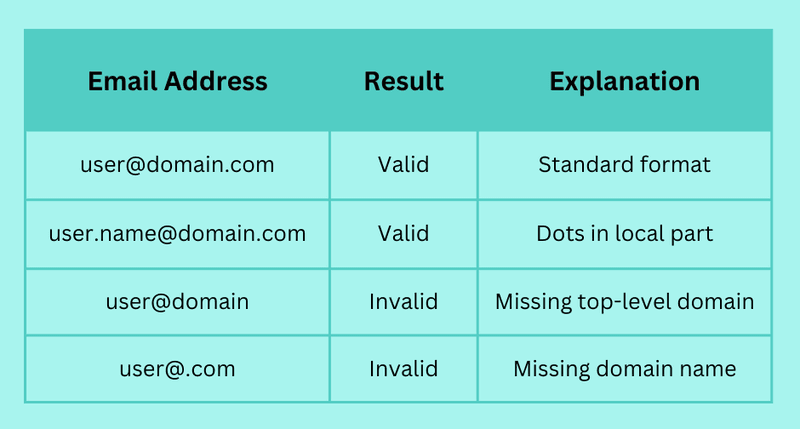
This regex pattern is simple and efficient for most common cases but may not cover all edge cases of valid email addresses as defined by RFC standards — a tradeoff StackAbuse also discusses when comparing simple and RFC-oriented regexes.
Creating a Robust Email Validation Function
Let’s build a more comprehensive email validation function that goes beyond basic pattern matching. This enhanced version includes error handling, user feedback, and additional validation checks.
Enhanced Validation Function
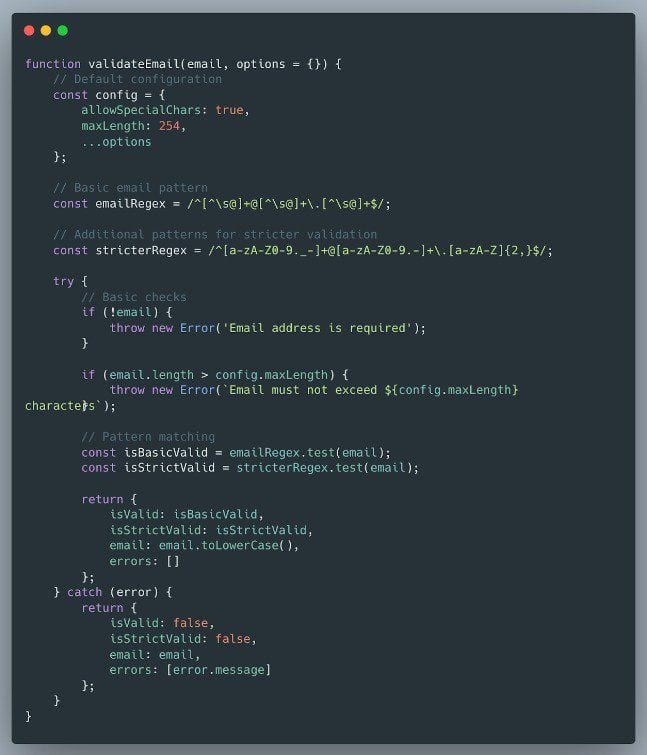
```javascript function validateEmail(email, options = {}) { // Default configuration const config = { allowSpecialChars: true, maxLength: 254 /* the SMTP spec's octet limit, not JS characters or UTF-16 code units */, ...options }; // Basic email pattern const emailRegex = /^[^s@]+@[^s@]+.[^s@]+$/; // Additional patterns for stricter validation const stricterRegex = /^[a-zA-Z0-9._-]+@[a-zA-Z0-9.-]+.[a-zA-Z]{2,}$/; try { // Basic checks if (!email) { throw new Error('Email address is required'); } if (email.length > config.maxLength) { throw new Error(`Email must not exceed ${config.maxLength} characters`); } // Pattern matching const isBasicValid = emailRegex.test(email); const isStrictValid = stricterRegex.test(email); return { isValid: isBasicValid, isStrictValid: isStrictValid, email: email.toLowerCase(), errors: [] }; } catch (error) { return { isValid: false, isStrictValid: false, email: email, errors: [error.message] }; } } ```
Implementation Best Practices
- Error Handling: Always return meaningful error messages
- Case Sensitivity: Convert emails to lowercase for consistency
- Length Validation: Implement maximum length checks
- Configuration Options: Allow customization for different use cases
Usage Examples
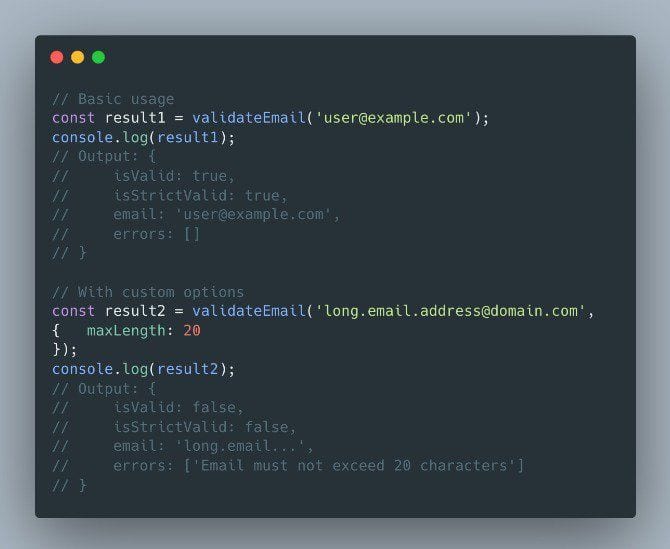
```javascript // Basic usage const result1 = validateEmail('[email protected]'); console.log(result1); // Output: { isValid: true, isStrictValid: true, email: '[email protected]', errors: [] } // With custom options const result2 = validateEmail('[email protected]', { maxLength: 20 }); console.log(result2); // Output: { isValid: false, isStrictValid: false, email: 'long.email...', errors: ['Email must not exceed 20 characters'] } ```
💡 Pro Tip:
For production environments, combine this client-side validation with server-side verification. Learn more about comprehensive validation in our guide on how to verify an email address.
Integration with Forms
Here’s how to integrate the validation function with HTML forms:
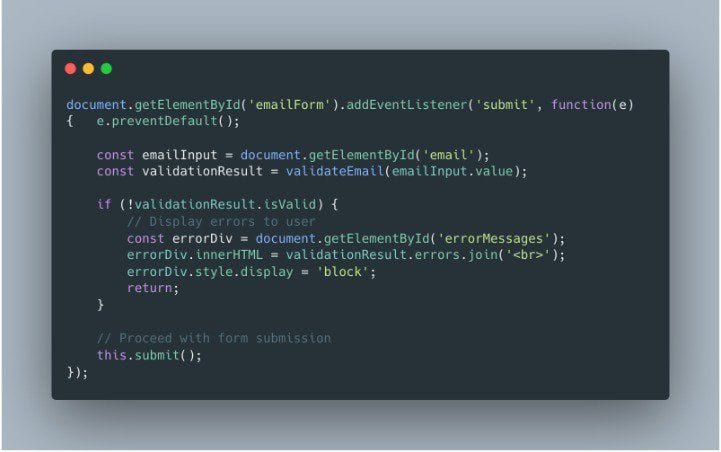
```javascript document.getElementById('emailForm').addEventListener('submit', function(e) { e.preventDefault(); const emailInput = document.getElementById('email'); const validationResult = validateEmail(emailInput.value); if (!validationResult.isValid) { // Display errors to user const errorDiv = document.getElementById('errorMessages'); errorDiv.innerHTML = validationResult.errors.join('
'); errorDiv.style.display = 'block'; return; } // Proceed with form submission this.submit(); }); ```
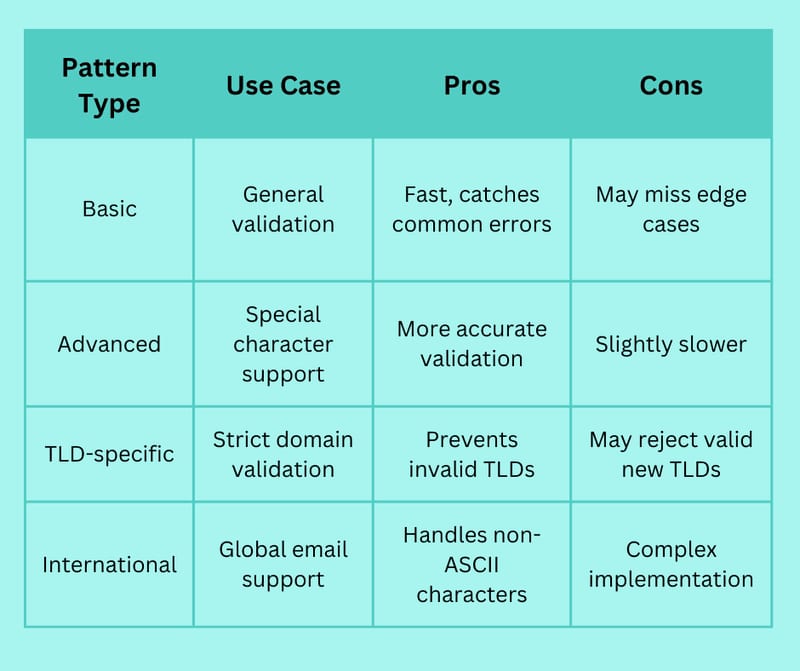
More complex patterns provide better validation but may impact performance. Choose a pattern that balances these aspects based on your application's needs.
Understanding email deliverability is crucial when implementing validation. Check out our guide on email deliverability for marketers to learn more about maintaining high delivery rates.
Validation Function Features

Advanced Email Validation Patterns
While the basic pattern works for most cases, some situations require more sophisticated validation. Let’s explore advanced patterns that handle complex email scenarios while maintaining performance.
Complex Validation Patterns
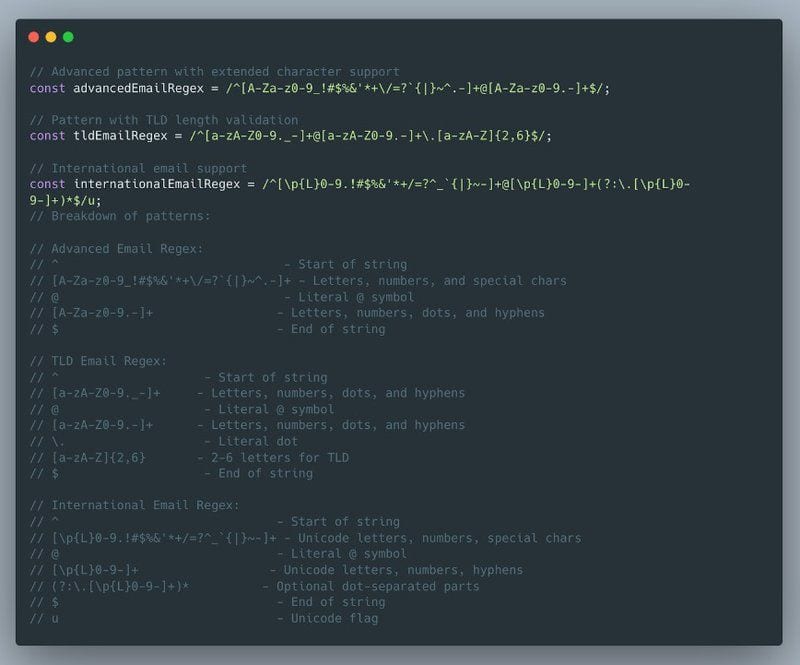
```javascript // Advanced pattern with extended character support const advancedEmailRegex = /^[A-Za-z0-9_!#$%&'*+/=?`{|}~^.-]+@[A-Za-z0-9.-]+$/; // Pattern with TLD length validation const tldEmailRegex = /^[a-zA-Z0-9._-]+@[a-zA-Z0-9.-]+\.[a-zA-Z]{2,63}$/; // International email support const internationalEmailRegex = /^[p{L}0-9.!#$%&'*+/=?^_`{|}~-]+@[p{L}0-9-]+(?:.[p{L}0-9-]+)*$/u; ```
⚠️ Performance Warning:
More complex patterns can impact validation speed. Always test performance with your specific use case and user volume.
Pattern Comparison
Implementation with Special Cases
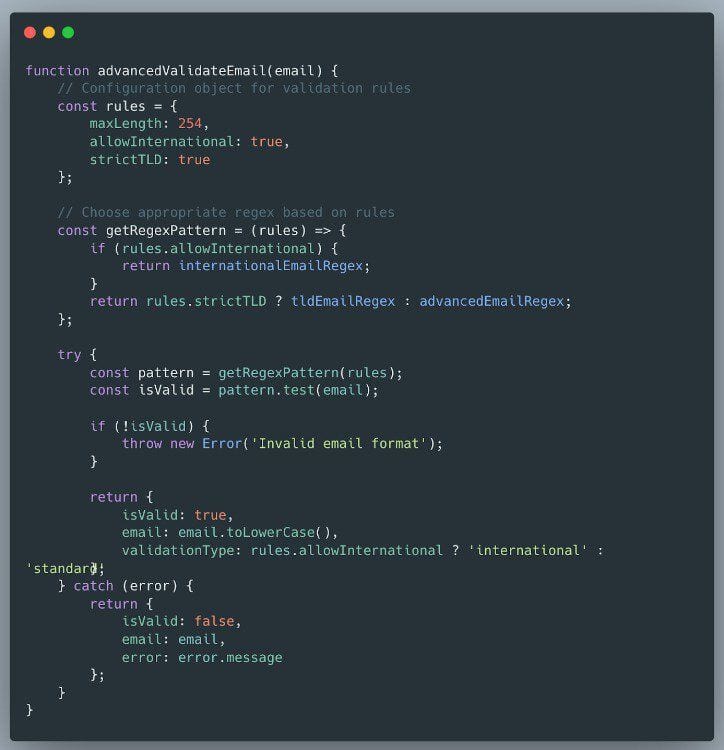
```javascript function advancedValidateEmail(email) { // Configuration object for validation rules const rules = { maxLength: 254, allowInternational: true, strictTLD: true }; // Choose appropriate regex based on rules const getRegexPattern = (rules) => { if (rules.allowInternational) { return internationalEmailRegex; } return rules.strictTLD ? tldEmailRegex : advancedEmailRegex; }; try { const pattern = getRegexPattern(rules); const isValid = pattern.test(email); if (!isValid) { throw new Error('Invalid email format'); } return { isValid: true, email: email.toLowerCase(), validationType: rules.allowInternational ? 'international' : 'standard' }; } catch (error) { return { isValid: false, email: email, error: error.message }; } } ```
More complex patterns account for special characters and multiple domain parts. An example is ^[A-Za-z0-9_!#$%&'*+/=?`{|}~^.-]+@[A-Za-z0-9.-]+$ which allows a wider range of valid email formats, similar to the advanced patterns AbstractAPI discusses.
Performance Optimization Tips
- Pattern Caching: Store compiled regex patterns instead of creating new ones
- Early Returns: Check basic conditions before applying complex patterns
- Lazy Loading: Load advanced patterns only when needed
- Batch Processing: Optimize for bulk validation scenarios
For production environments, consider combining these patterns with proper email verification services. Learn more about comprehensive validation approaches in our guide to email validation best practices.
💡 Pro Tip:
Monitor your email deliverability metrics when implementing advanced validation patterns to ensure they’re not unnecessarily restricting valid email addresses.
Implementation Best Practices
Implementing email validation effectively requires more than just copying and pasting regex patterns. Let’s explore the best practices that ensure reliable, secure, and user-friendly email validation.
Security Considerations
🔒 Security Best Practices:
- Never rely solely on client-side validation
- Implement rate limiting for validation requests
- Sanitize email inputs before processing
- Use HTTPS for form submissions
Consider additional server-side validation to handle more complex cases and prevent invalid data from being processed — ZeroBounce similarly notes that front-end regex is only a pattern check and recommends more advanced verification.
User Experience Guidelines
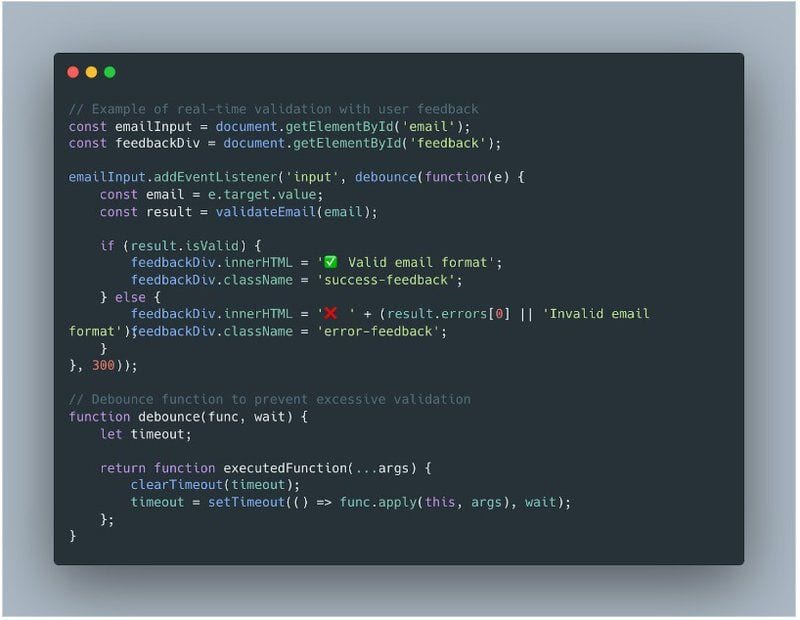
```javascript // Example of real-time validation with user feedback const emailInput = document.getElementById('email'); const feedbackDiv = document.getElementById('feedback'); emailInput.addEventListener('input', debounce(function(e) { const email = e.target.value; const result = validateEmail(email); if (result.isValid) { feedbackDiv.innerHTML = '✅ Valid email format'; feedbackDiv.className = 'success-feedback'; } else { feedbackDiv.innerHTML = '❌ ' + (result.errors[0] || 'Invalid email format'); feedbackDiv.className = 'error-feedback'; } }, 300)); // Debounce function to prevent excessive validation function debounce(func, wait) { let timeout; return function executedFunction(...args) { clearTimeout(timeout); timeout = setTimeout(() => func.apply(this, args), wait); }; } ```
Implementation Checklist
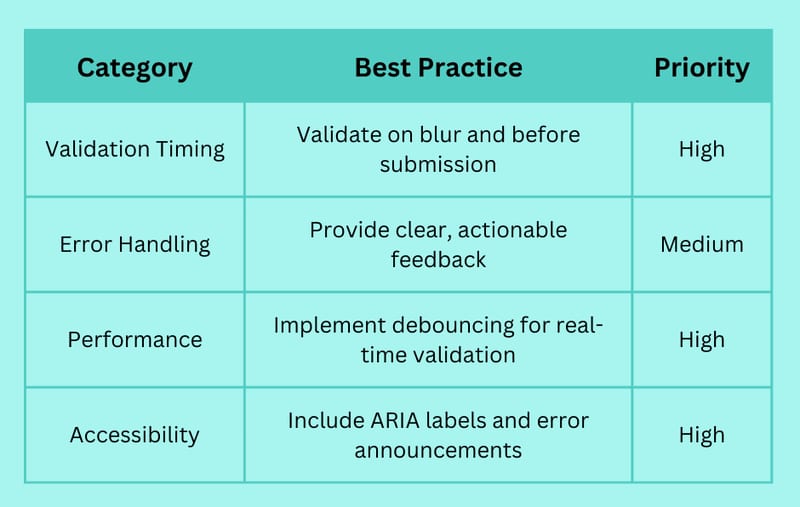
Common Pitfalls to Avoid
- Over-validation: Don’t make patterns too restrictive
Allow valid special characters
Consider international email formats
Support new top-level domains - Poor Error Messages: Provide specific, helpful feedback
Explain what’s wrong
Suggest how to fix it
Use friendly language - Performance Issues: Optimize validation timing
Implement debouncing
Cache regex patterns
Avoid unnecessary validations
💡 Pro Tip:
Maintain good email hygiene by combining client-side validation with comprehensive email verification services.
Integration with Email Marketing Systems
When implementing email validation as part of a larger marketing system, consider these additional best practices:
- Implement progressive validation for multi-step forms
- Store validation results for future reference
- Track validation failure patterns to improve user experience
- Integrate with your email deliverability strategy
🎯 Implementation Strategy:
Start with basic validation and gradually add more sophisticated checks based on your specific needs and user feedback. Monitor validation failures to identify patterns and adjust accordingly.
Testing and Troubleshooting
A robust email validation implementation requires thorough testing and debugging. Let’s explore comprehensive testing strategies and solutions to common issues.
Essential Test Cases
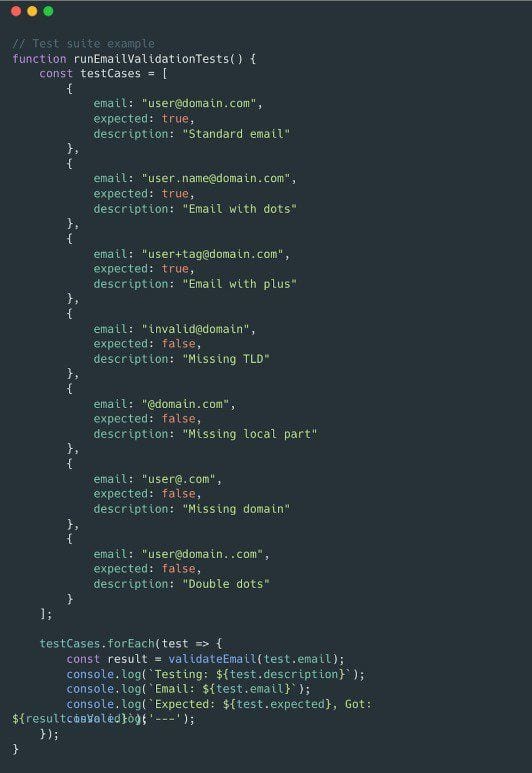
```javascript // Test suite example function runEmailValidationTests() { const testCases = [ { email: "[email protected]", expected: true, description: "Standard email" }, { email: "[email protected]", expected: true, description: "Email with dots" }, { email: "[email protected]", expected: true, description: "Email with plus" }, { email: "invalid@domain", expected: false, description: "Missing TLD" }, { email: "@domain.com", expected: false, description: "Missing local part" }, { email: "[email protected]", expected: false, description: "Missing domain" }, { email: "[email protected]", expected: false, description: "Double dots" } ]; testCases.forEach(test => { const result = validateEmail(test.email); console.log(`Testing: ${test.description}`); console.log(`Email: ${test.email}`); console.log(`Expected: ${test.expected}, Got: ${result.isValid}`); console.log('---'); }); } ```
Testing Matrix
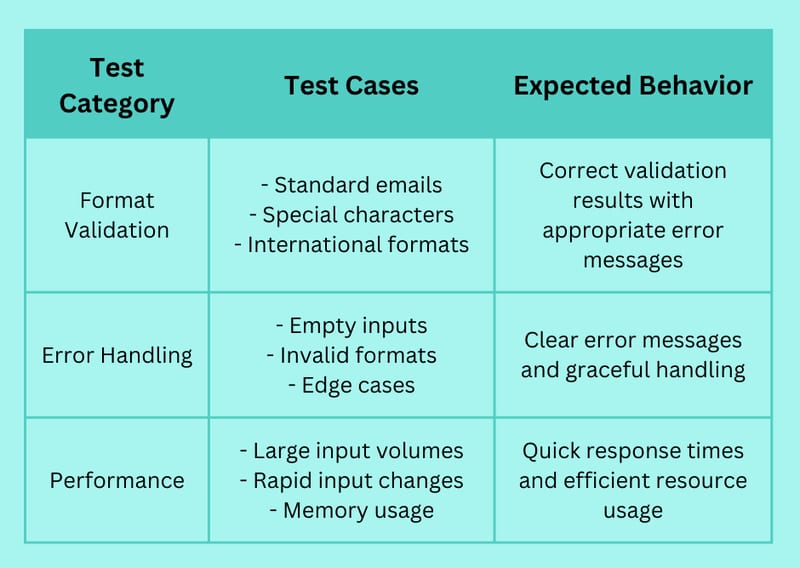
Debugging Common Issues
🔍 Debug Checklist:
- Verify regex pattern syntax
- Check for proper event handling
- Confirm error message display
- Test input sanitization
- Validate performance metrics
Performance Optimization
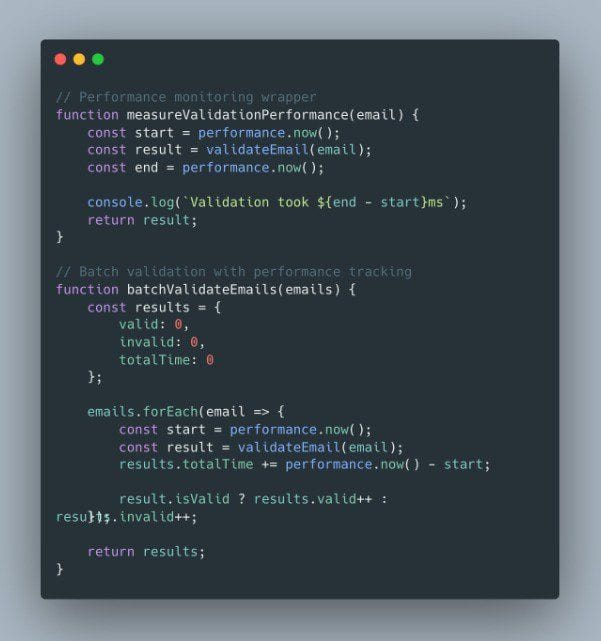
```javascript // Performance monitoring wrapper function measureValidationPerformance(email) { const start = performance.now(); const result = validateEmail(email); const end = performance.now(); console.log(`Validation took ${end - start}ms`); return result; } // Batch validation with performance tracking function batchValidateEmails(emails) { const results = { valid: 0, invalid: 0, totalTime: 0 }; emails.forEach(email => { const start = performance.now(); const result = validateEmail(email); results.totalTime += performance.now() - start; result.isValid ? results.valid++ : results.invalid++; }); return results; } ```
💡 Pro Tip:
Always test your validation implementation with real-world email formats. Check our guide on email format for comprehensive testing scenarios.
Troubleshooting Guide
- Pattern Matching Issues
Verify regex syntax
Test with edge cases
Check for proper escaping - Performance Problems
Implement debouncing
Optimize regex patterns
Cache validation results - User Experience Issues
Review error message clarity
Test feedback timing
Verify accessibility features
While regex validation can catch many invalid formats, additional server-side validation is recommended for security and to handle more edge cases — a practice Mailtrap also recommends.
For comprehensive email verification, consider combining this client-side validation with a robust verification service. Learn more about complete verification processes in our guide on how to verify an email address.
Conclusion
Implementing effective email validation using JavaScript regex is crucial for maintaining clean contact lists and ensuring reliable communication. Throughout this guide, we’ve covered everything from basic patterns to advanced implementation strategies.
Key Takeaways
- Use the basic regex pattern (
/^[^s@]+@[^s@]+.[^s@]+$/) for most common validation needs - Implement advanced patterns for specific requirements like international email support
- Always combine client-side validation with server-side verification
- Consider user experience when implementing validation feedback
- Regular testing and monitoring ensure continued effectiveness
Recommended Next Steps
- Implement the basic validation pattern in your forms
- Add real-time validation feedback for better user experience
- Test your implementation with various email formats
- Monitor validation performance and user feedback
- Consider integrating with a comprehensive email verification service
⚠️ Important Reminder:
While regex validation is an excellent first line of defense, maintaining good email deliverability requires a comprehensive approach to email validation and verification.
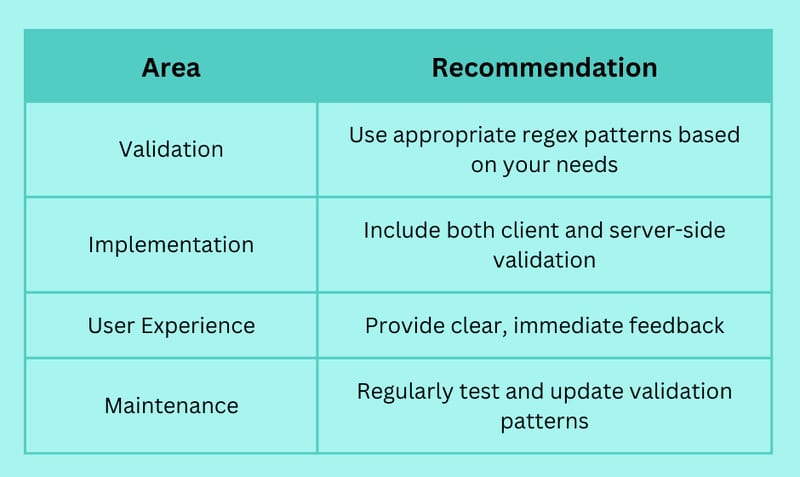
Best Practices Summary
Take Your Email Validation to the Next Level
Ready to implement robust email validation in your applications? Start with the patterns and practices outlined in this guide, then enhance your validation process with automated email verification services.
We write from the practical side of email list cleaning: what helps marketers keep real subscribers, reduce bounces, and avoid turning hygiene into another recurring chore.